


Modern Office Furniture for Irvine Tech Companies
A tech office’s furniture is part of its operating system. Modern office furniture for tech companies in Irvine brings together ergonomic desks and chairs, considered space planning, and furnishings chosen for each area’s needs. The goal is a workplace that supports focused work, team coordination, and changing work patterns without treating every space alike.
Comfort and efficient use of space matter, as does how people move between individual work areas, collaboration zones, and meeting rooms. Plan the layout first, then select furniture to suit it. This helps decision-makers assess the workplace as a whole rather than choosing pieces in isolation.
This guide explains what to consider when planning a tech workplace in Irvine, from desk and seating choices to workstation layouts, conference areas, and installation. You’ll learn how the project’s requirements shape the right furnishings and how 3S Interior Design supports businesses with commercial office furniture, space planning, procurement, delivery, and installation.
Table of Contents
Ergonomic and height-adjustable desks and office chairs
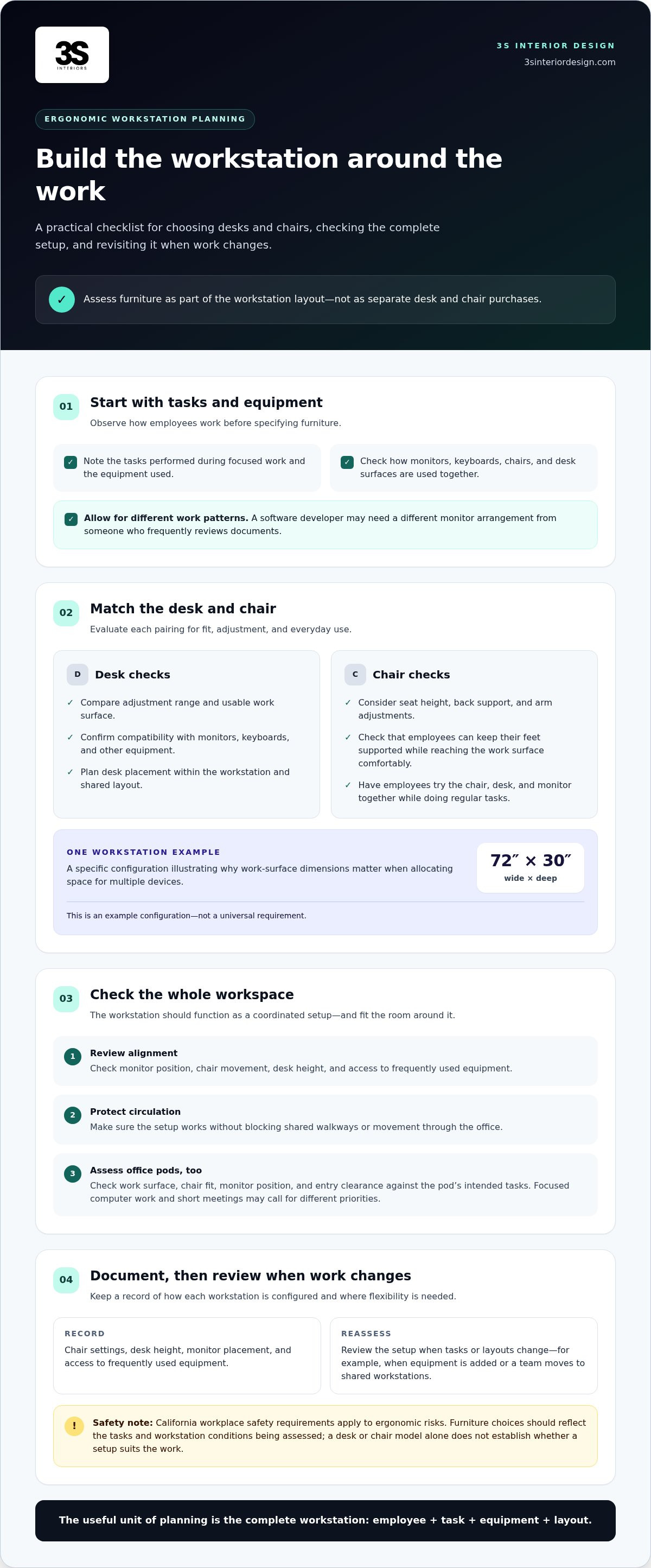
Choose desks and chairs around employees’ tasks, monitor placement, and the movements each workspace needs to support. In Irvine offices, assess adjustable furniture as part of the workstation layout, not as a stand-alone purchase.
Ergonomic Desks and Office Chairs
Compare sit-stand desks by their adjustment range, usable work surface, and compatibility with monitors, keyboards, and other equipment. One workstation example measures 72 inches wide by 30 inches deep, illustrating why surface dimensions matter when allocating space for multiple devices. Treat that as a specific configuration, not a universal requirement.
When assessing chairs, consider seat height, back support, arm adjustments, and whether employees can keep their feet supported while reaching the work surface comfortably. Pair each chair with its desk instead of selecting them independently. Have employees try the chair, desk, and monitor together while doing their regular tasks.
Ergonomic Consultations and Workstation Planning
An ergonomic review should account for employees’ actual tasks, equipment, and workstation setup. Note how they use monitors, keyboards, chairs, and desk surfaces during focused work, then identify adjustments that could improve fit. A software developer, for example, may need a different monitor arrangement from someone who frequently reviews documents.
Use these observations to plan desk placement and select adjustable furniture. Check that monitor position, chair movement, and desk height work together without blocking shared walkways. Assess the complete workspace rather than treating each furniture item as a separate decision.
California workplace safety requirements apply to ergonomic risks. Furniture selection should reflect the tasks and workstation conditions being assessed. A desk or chair model alone does not establish whether a workstation suits the work being performed.
Document how each workstation is configured and where employees need flexibility. Review chair settings, desk height, monitor placement, and access to frequently used equipment. Repeat the review when tasks or layouts change, such as when a team adds equipment or moves from assigned desks to shared workstations.
Office pods also need a practical fit assessment. Check the work surface, chair fit, monitor position, and entry clearance against the tasks the pod will support. A pod for focused computer work needs a usable setup for its monitor and input devices; a short-meeting space may call for different furniture and layout priorities.
When sourcing modern office furniture for tech companies Irvine, the decision is not simply whether to buy adjustable desks. Match each desk and chair to employees’ tasks, assess the full workstation arrangement, and include pods in the review when they form part of the workspace plan.
3S Interior Design provides professional in-house installation crews to properly assemble desks and workstations. 3S Interior Design maintains an extensive in-stock warehouse selection of modern office desks, ergonomic chairs, and storage solutions ready to ship. Clients looking for modern office furniture for tech companies Irvine can easily furnish their spaces with flexible purchasing options tailored to growing businesses.
Furniture planning for Irvine business districts
Furniture planning for an Irvine office starts with the floor plan, team structure, and daily movement through the workplace. A technology firm near the Irvine Spectrum, for example, may need focused workstations, project tables, and clear routes between engineering and meeting areas. Let those needs guide furniture selection before specifying individual pieces.
Companies seeking refurbished or sustainability-minded furniture can begin by retaining usable existing pieces and planning around them. Refurbished commercial furniture is generally purchased through resale channels; new selections can also support longer use when they are durable and adaptable. A layout should identify which items remain, which need replacement, and how each fits the workplace.
Space planning translates work requirements into zones. Mark workstations, private offices, conference areas, reception, storage, and circulation paths on the floor plan. Then assess how employees move between them during a typical day. Placing shared project tables near team workstations, for example, can support collaboration without routing the main walkway through a focused work area.
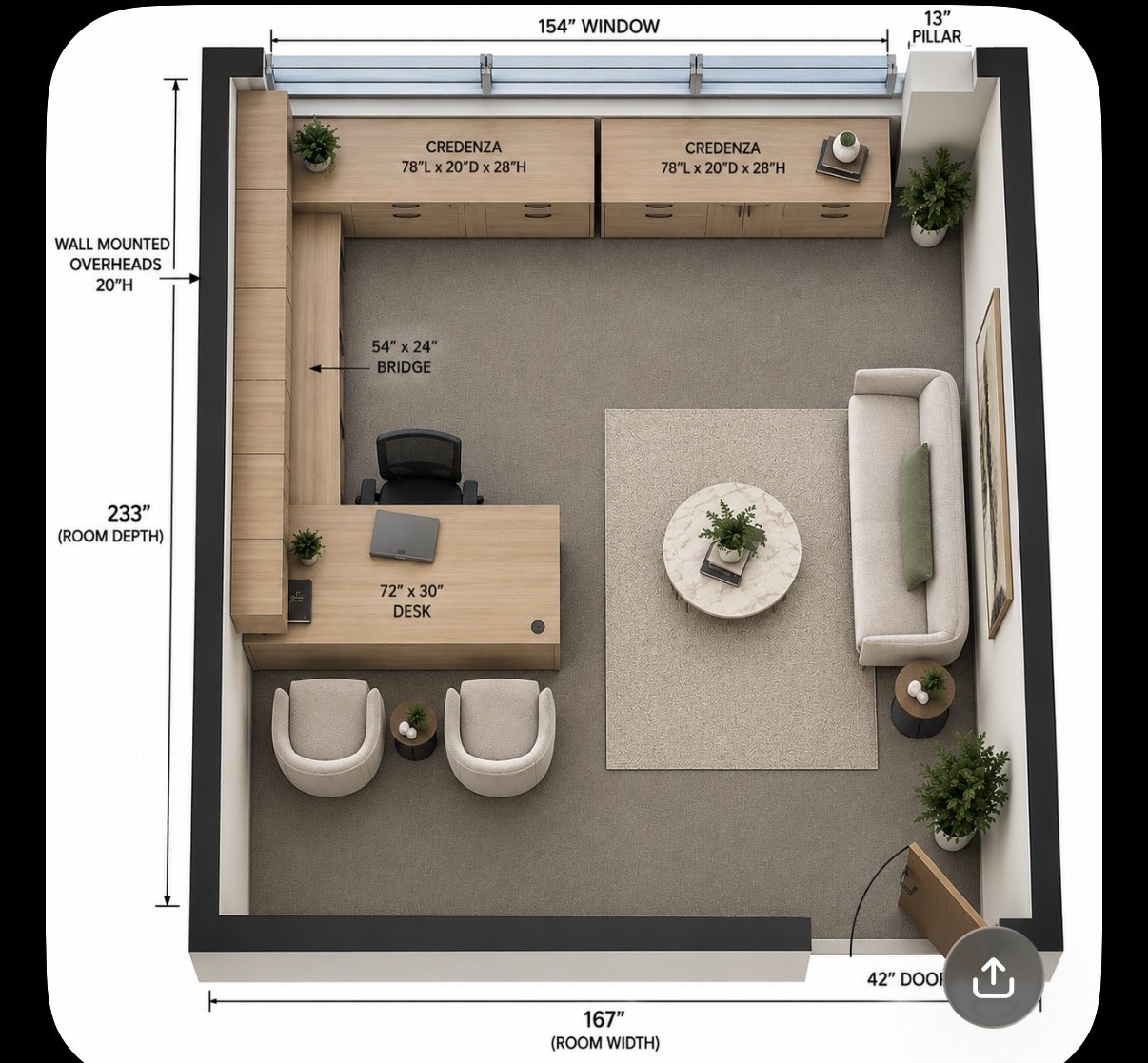
A 3D layout helps decision-makers review how furniture may occupy the space before installation. It can show the relationship between desks, chairs, tables, doors, and shared areas. Use the visual plan to identify congested routes, blocked access, or meeting spaces that feel disconnected from the teams using them. Revise the arrangement before moving to furniture selection.
CAD-based planning adds precise floor-plan information to the review. Start with available building measurements and fixed features such as walls, columns, doors, and windows. Add furniture footprints and compare arrangements. This helps teams determine whether workstations fit the actual space instead of relying on a rough sketch or assumptions about room capacity.
For companies with multiple Irvine offices, tie each plan to the building’s conditions and the team’s needs. A shared furniture standard can create consistency across locations, while individual layouts account for different room shapes, entrances, and work patterns. Documenting those choices gives facilities teams a useful reference when teams or functions change.
Use this sequence to make planning decisions:
Record building features and the functions each area must support.
Map furniture zones, circulation, and shared tables in a draft layout.
Review the plan in 3D, then adjust placement where movement or access is constrained.
Specify new or retained furniture to match the final arrangement.
A showroom review can help teams compare furniture proportions and finishes against the plan, but the floor plan should remain the decision tool. For Irvine projects, office space planning and layout design can connect furniture choices to the way each workplace operates.
Private offices, meeting rooms, and collaboration areas
Define each area’s role before selecting furniture. A private office supports concentrated work, a meeting room supports scheduled discussion, and a collaboration area gives teams space to review projects together. In an Irvine tech workplace, matching furniture to these functions helps prevent one room from becoming an improvised solution for every need.
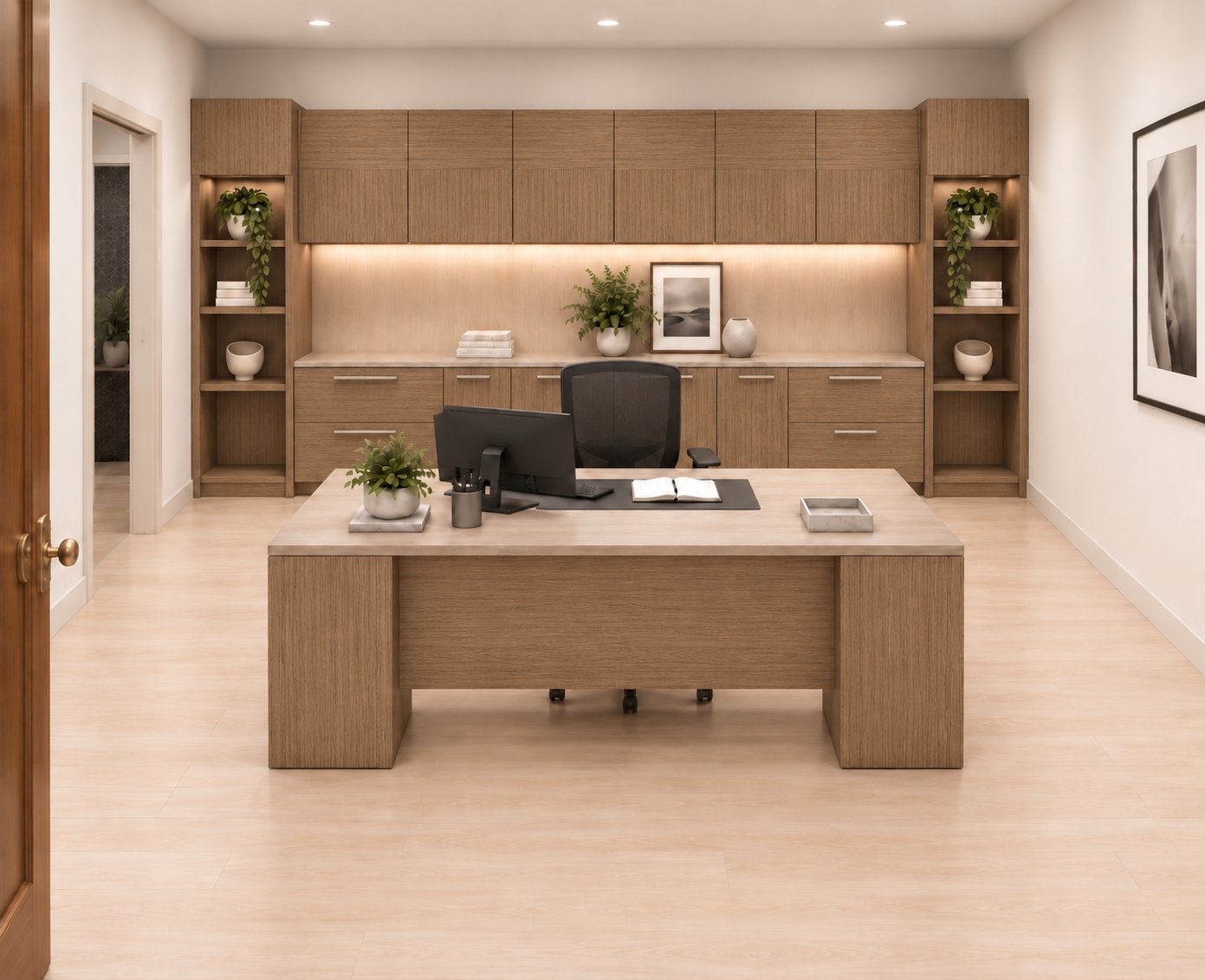
For private offices, begin with the tasks performed there. A manager who reviews documents and holds one-on-one discussions may need a desk, supportive seating, and room for a visitor. A developer using the room for focused computer work may prioritize equipment placement and clear desk space. List the required furniture, then check how the arrangement affects movement through the room.
For shared work areas, compare cubicles and benching against the privacy and interaction needs of each team. One available configuration is a 6-by-6 cubicle workstation with 46-inch-high panels. A benching workstation option has 34-inch-high panels. Those panel heights offer a concrete starting point for comparing layouts, but the choice should also account for how teams communicate and share equipment.
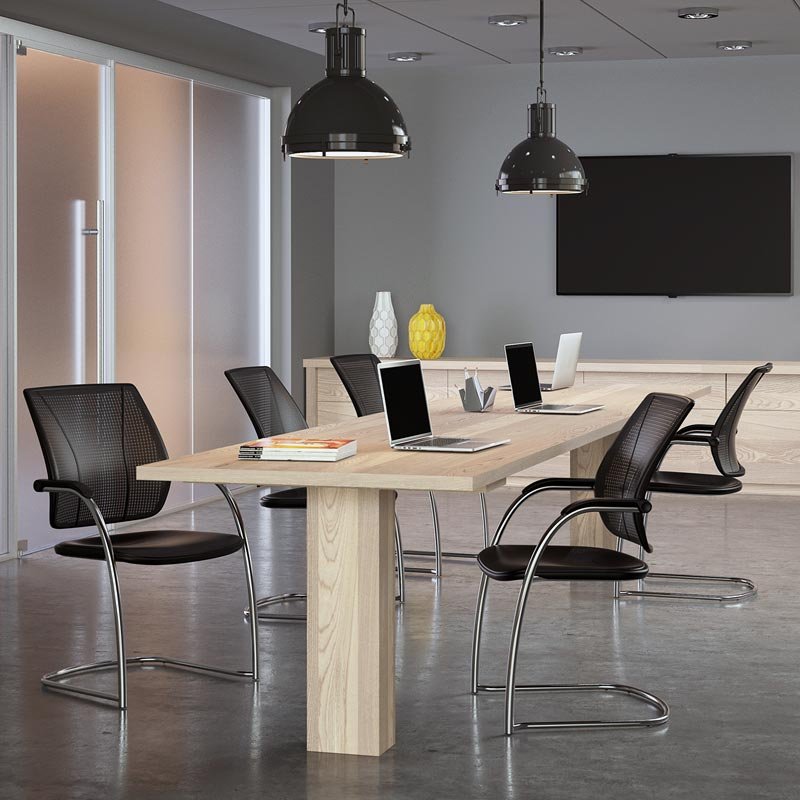
Meeting rooms need layouts suited to how people use them. A room for project reviews may need a central table, seating arranged for discussion, and clear access to presentation equipment. A space for private conversations may call for a more enclosed arrangement. Before choosing furniture, list the room’s main meeting types and what must remain accessible during each.
Collaboration areas serve a different purpose from formal meeting rooms. A software team reviewing a release plan, for example, may need a shared table where colleagues can gather around documents or devices. Place the area near the teams that use it while keeping routes to workstations clear. A defined location also helps separate group discussion from individual work.
Use this review sequence to compare layouts:
Assign each room a primary function, such as focused work, client meetings, or project collaboration.
List the furniture and equipment required for that function.
Compare cubicles, benching, and private-room arrangements against the team’s need for separation and interaction.
Check movement between workstations, meeting areas, and shared tables before finalizing placement.
Consider height and panel configuration as part of the full room plan, not as isolated specifications. For instance, compare the 34-inch benching panels with the 46-inch cubicle panels in the context of adjacent teams, sightlines, and intended use. This gives facilities teams a practical basis for selecting an arrangement that fits the work, rather than choosing furniture by appearance alone.
Commercial office furniture for tech offices
Choose tech workplace furniture to suit work patterns, team structure, and room functions. Assess each item against its planned use, from employee seating to conference tables and storage.
Modern Furniture Styles for Tech Companies
Prioritize coordinated, functional furnishings over a single decorative theme. A technology office can combine shared workstations, enclosed meeting rooms, and private offices while using consistent finishes throughout. Choose materials and colors that suit the interiors; orange accents, for example, can distinguish a collaboration zone without defining the whole workplace.
Assess furniture in context. Match desk dimensions and storage to equipment and documents, then check that cabinets do not obstruct circulation. In a conference area, consider whether the table and seating support the meeting format. The right style is one that fits daily operations and brings distinct work zones together.
Furniture Brands for Modern Tech Offices
No single furniture brand is right for every tech office. Compare desks, chairs, storage, and conference furniture against the project’s layout and use requirements. For example, assess whether a proposed workstation system fits the team arrangement and whether its seating suits employees’ work needs.
Evaluate each option as part of the full furniture plan, not as a stand-alone product. Check dimensions, configurations, finish choices, and how pieces coordinate across private offices and shared areas. A shortlist based on these criteria helps decision-makers compare practical fit instead of relying on brand recognition alone.
Irvine Dealers Serving Tech Companies
Irvine companies can work with commercial furniture specialists to plan and furnish business workspaces. For a tech office, assess whether the project scope covers the required furniture categories and how selection, delivery, and installation fit the workplace plan. This matters when a project includes workstations, conference rooms, and employee seating.
Choose a furniture partner based on its ability to address the project as a coordinated workplace, not a collection of separate purchases. A facilities team planning an office refresh, for example, can organize requirements by zone and assess how proposed furniture supports each area. Keep the evaluation focused on commercial furniture and workplace needs.
Before specifying furniture, document the work each area supports and the pieces it requires. A practical review can include:
Workstations and chairs for employee tasks.
Conference furniture for planned meeting formats.
Cabinets and storage for materials used by each team.
Shared tables and seating for collaboration areas.
Review these categories together to identify gaps between the floor plan and the proposed furniture. A conference room plan, for example, should account for its table, seating, and storage, while a shared work area needs its own furniture schedule. This structured comparison helps Irvine decision-makers assess commercial furniture against actual workspace requirements.
What modern office furniture styles work best for tech companies?
Functional, coordinated furniture works best when it supports specific tasks and office zones. For an Irvine technology company, begin by matching each furniture choice to how employees use the space.
A restrained contemporary style can combine clear work surfaces, practical storage, and coordinated finishes. Use consistent desk finishes across engineering workstations, for example, then distinguish a project area with a different table or seating arrangement. This creates visual order without making departments feel disconnected.
Choose furniture by function before decorative detail. A private office may need a desk and storage for individual work, while a conference room needs a table and seating suited to group discussion. Reception furniture serves another purpose: defining the arrival area and giving visitors a clear place to wait.
Open work areas benefit from furniture that supports individual tasks and team coordination. A workstation layout might include shared desks for daily computer work, nearby tables for project reviews, and cabinets for frequently used materials. Align each piece with the team’s workflow rather than adding furniture just to fill floor space.
Use this practical selection sequence:
Assign each zone a primary function, such as focused work, meetings, or visitor reception.
Select desks, seating, tables, and storage that support that function.
Coordinate finishes across adjacent areas, then use limited accents to distinguish spaces.
Review the full arrangement against the floor plan before finalizing furniture placement.
A software team, for example, could use coordinated desks for regular work, a shared table for sprint planning, and enclosed storage for equipment or documents. These choices create a consistent interior while giving each zone a distinct purpose. A separate conference room can use complementary finishes to connect the workplace without repeating the same furniture arrangement.
Durability and adaptability matter in a technology workplace. Consider how a room might be used if a team changes its equipment, meeting format, or seating arrangement. Furniture that can be rearranged within the planned layout gives facilities teams more flexibility than pieces designed for only one fixed setup.
Before approving a style, review the proposed furniture together in the context of the office plan. Check how desks, chairs, cabinets, and meeting tables relate to one another, and whether accent choices support clear wayfinding. Plan furniture for your tech workplace around the functions each area needs to serve.
3S Interior Design: Private Office Desks & Casegoods
3S Interior Design helps Irvine businesses coordinate private office desks and casegoods with the broader needs of a commercial workspace. Turn to the company when a technology office needs furniture selected alongside its layout, rather than as a series of unrelated purchases.
Options include ergonomic office seating, workstations and cubicles, and conference room furniture. Coordinating these categories can help align private offices, employee work areas, and meeting rooms with the functions each space serves. 3S Interior Design manages projects from consultation and space planning through product selection, procurement, delivery, and professional installation.
For a new office or a workplace update, prepare a floor plan and outline the needs of each area. That gives the furniture planning process a practical starting point. Contact 3S Interior Design to discuss your office project, or visit 3sinteriordesign.com.
Move Your Workplace Plan Forward
Planning modern office furniture for tech companies in Irvine is an opportunity to align workplace decisions with your company’s next phase. Before selecting furnishings, define what needs to change: support for focused work, more effective team coordination, or a layout that can accommodate evolving operations. Clear priorities turn broad design goals into a practical project scope.
3S Interior Design can support that process with Private Office Desks & Casegoods, Ergonomic Office Seating, and Workstations & Cubicles. These options give business decision-makers a starting point for matching furniture to specific work areas. Share your priorities and workspace requirements to begin a focused discussion about your project.
Contact 3S Interior Design to discuss the next steps for your office. A well-planned workplace can give your team a more functional foundation for the work ahead.
Frequently Asked Questions
What ergonomic desks and chairs are best for a tech office?
Choose adjustable desks and chairs that suit employees’ tasks and allow the seat, desk, and monitor to be positioned together. For a software developer, assess whether the chair supports regular computer work and whether the desk can change height for different tasks. Compare seat adjustments, back support, surface space, and equipment placement as a set. Then review the setup with the employee using their usual monitor, keyboard, and work materials.
What furniture supports hybrid work, collaboration, and flexible teams?
Hybrid teams benefit from a mix of shared workstations, individual seating, and meeting furniture. A team that meets in person for project reviews, for example, can use a shared table while keeping workstations available for focused tasks. Consider how employees reserve or share work areas, where they store personal or team equipment, and how meeting spaces support in-room discussion and remote participants. Match the furniture plan to actual work patterns.
How should a tech company plan an office furniture layout and budget?
Start by mapping work functions, existing furniture, and the spaces that need new furnishings. Group requirements by area, such as workstations, meeting rooms, storage, and reception, then rank them by operational priority. Build the budget around the project scope, furniture choices, delivery, and installation needs. For modern office furniture for tech companies in Irvine, a documented layout helps decision-makers compare options and adjust priorities before procurement begins.
Which Irvine office furniture vendors offer space planning and design services?
3S Interior Design provides space planning and layout design for commercial workplaces, including tech offices in Irvine. Its Southern California business coverage includes Los Angeles, Santa Monica, Encino, Burbank, Beverly Hills, Century City, Culver City, Brentwood, Compton, Long Beach, Carson, Thousand Oaks, Westlake Village, Pomona, Valencia, and Sherman Oaks. Companies can use its planning service to connect furniture decisions with workplace requirements and project layouts.
Comments